
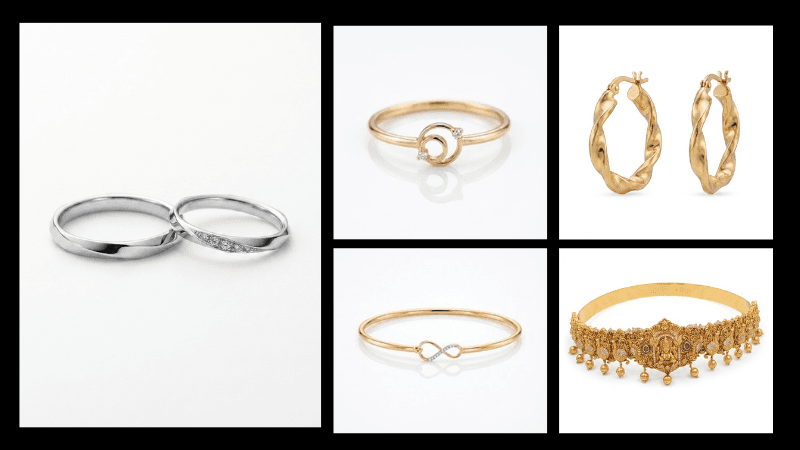
White Background Jewellery Photography: How to Create Ecommerce-Ready Images with AI
A ring on a white background sounds like the simplest photo you could take. In practice, it's one of the harder ones to get right. The background has to read as genuinely pure white, not grey, not cream, not slightly blown out at the edges, while the metal and stones still look accurate. Get the white wrong and the whole listing looks unfinished, even if the jewellery itself is shot well. This is where AI product photography has started changing the workflow, letting sellers get a compliant white background without lighting a full studio sweep every time.
This guide covers what a genuinely correct white background actually is, why jewellery makes it harder than most products, what the major marketplaces actually require, and how to get there with a camera, a phone, or AI. Everything here applies specifically to ecommerce jewellery photography, where the background isn't just a style choice, it's often a listing requirement.
What "White Background" Actually Means
"White background" isn't a style choice, it's a technical spec. A true white background photography standard means the background reads as pure white, RGB 255, 255, 255, not an off-white, a warm cream, or a light grey that looks white on a phone screen but isn't.
This matters because marketplaces check for it. A background that's 240, 240, 240 instead of 255, 255, 255 can still get flagged, even though most people can't tell the difference by eye. The product also needs to sit cleanly against that background, no visible shadow line, no colour cast from the surface it's sitting on, and no gradient where the white fades slightly toward the edges of the frame.
Why Jewellery Is Harder to Shoot This Way Than Most Products
White background product photos are already a skill on their own. The core product photography white background technique doesn't change much between categories, until you add reflective metal into the mix. Jewellery adds a second problem on top of the usual lighting setup.
A white background only works if the light hitting the product and the light hitting the background are balanced. Too much light on the background and it blows out, taking the edge of the product with it. Too little and the white looks grey. For most products, this balance is achievable with a couple of diffused lights. For jewellery, the metal itself reflects the white background and the studio around it, so gold or silver can pick up a colour cast or a blown-out patch exactly where you need it to look clean.
This is the real reason white background jewellery photography has its own set of rules, separate from general product photography. The background and the product are fighting for the same light, and jewellery's reflectivity makes that fight harder to win.
What the Marketplaces Actually Require
The advice sounds simple ("use a white background"), but the specifics differ by platform, and getting them wrong is what causes listings to get rejected or buried.
Amazon:
Requires a pure white background (RGB 255,255,255) for the main product image, with the product filling roughly 85% of the frame. No text, no props, no watermark. This is treated as a compliance requirement, not a style preference, and listings without it can be flagged or demoted in search.
Flipkart and Meesho:
Both follow the same pure-white standard for the primary listing image, in line with the wider marketplace norm across Indian ecommerce.
Etsy:
This is the exception worth knowing. Etsy doesn't require a white background at all, and actively allows styled, lifestyle, or on-model photography for the main image. What Etsy does enforce is resolution (2000px minimum on the shortest side) and a square crop for the thumbnail, not background colour. A clean white or neutral background still performs well as the lead image for many jewellery sellers, but it's a choice on Etsy, not a compliance requirement the way it is on Amazon.
If you're selling on Etsy specifically, a true white background is still worth having in your set, just not as the only image. A clean white hero shot photographs detail accurately and works well as image one or two, with styled or lifestyle shots filling the rest of your ten slots. The two aren't in competition, Etsy just gives you the option Amazon doesn't.
Shopify:
Doesn't legally require it, but a pure or near-pure white background is still the default for product grids, since it's what keeps a catalogue looking consistent when products are shot at different times.
Resolution:
Most platforms expect at least 2000px on the longest side for the main image. Anything smaller tends to look soft once a platform's zoom function kicks in.
If you sell on more than one platform, it's worth shooting (or generating) with enough range that the same base image can be cropped and adjusted per channel, rather than reshooting for every marketplace separately.
How to Shoot a True White Background Yourself
Use a proper white sweep, not a white wall:
A seamless white backdrop, paper or fabric, curves where the floor meets the background so there's no visible seam or shadow line. A flat white wall almost always shows a faint line where it meets the surface the jewellery is sitting on.
Light the background separately from the product:
This is the step most DIY setups skip. If you only light the jewellery, the background behind it stays grey in the shot even if it's physically white paper. A second light aimed at the background, slightly brighter than the product lighting, is what actually pushes it to true white.
Diffuse every light source:
Direct light on metal creates hard reflections and blown-out patches. Softboxes, diffusion paper, or light bounced off white card all soften this. For jewellery specifically, light from both sides prevents one side of the piece going dark while the other overexposes.
Shoot slightly underexposed, then correct in post:
It's easier to brighten a background to pure white in editing than to fix a background that's already blown out and taken product detail with it. A close-to-white in-camera shot with proper RGB correction afterward is more reliable than trying to nail 255,255,255 live.
Clean the piece and check for dust under zoom:
White backgrounds show every flaw. Dust and fingerprints that are invisible in person become obvious once the image is zoomed in against a stark white field.
What Goes Wrong Most Often
The white isn't actually white:
The most common issue. A background that looks white on a small screen often measures closer to light grey or a faint warm tone once checked properly, which is exactly what causes marketplace rejections.
Blown-out edges:
Overexposing the background to force it white often overexposes the edge of the product along with it, especially on light-coloured stones or pale gold.
A visible shadow or seam line:
Usually from using a flat wall instead of a proper sweep, or from a single light source that isn't covering the background evenly.
Colour cast from reflection:
Metal picking up a warm or cool tint from the lighting setup around it, making gold look slightly off or silver look slightly blue.
Inconsistency across a catalogue:
One product shot with a true white background next to one that's slightly grey makes an entire store look unplanned, even if each individual photo is technically fine.
Where AI Fits Into This
The appeal of AI here is specific: instead of balancing two light sources and correcting exposure by hand, a pure white background can be generated directly, without a physical sweep or a separate background light at all.
This is a direct setting in AIVX rather than something you have to describe or hope for. You upload a photo of the piece, and a true white background, RGB 255,255,255, compliant with Amazon, Flipkart, and Meesho's requirements, can be selected as an output option. The same understanding of the product's structure, scale, and material that AIVX applies elsewhere is what keeps the metal and stones looking accurate against that background, rather than just placing the product on a white rectangle.
As with any AI output, it's worth checking the result the same way you'd check a studio shot: no colour cast on the metal, no odd edge artefacts, and the white genuinely reading as white rather than assumed to be correct. This white-background setting is one part of the broader AI jewellery photography workflow, which also covers styled and lifestyle shots for platforms like Etsy that don't require white at all.
FAQs
What RGB value counts as a true white background?
255, 255, 255. Anything below that, even 240 or 245, can read as slightly grey once checked, which is often enough to get a listing flagged on marketplaces with strict image requirements.
Why does my white background look grey in photos?
Usually because the background isn't lit separately from the product. If only the jewellery is lit, the white paper or fabric behind it stays underexposed and reads as grey, even though it's physically white.
Do all marketplaces require a pure white background?
Amazon, Flipkart, and Meesho require it for the main listing image. Shopify doesn't require it legally, but most sellers use it anyway to keep a catalogue looking consistent. Etsy is the outlier: it doesn't require white at all, and styled or lifestyle photography is fully allowed for the lead image.
Can I get a compliant white background without a studio setup?
Yes. A phone photo of the piece on a plain surface is enough as a starting point, AIVX can generate a true white, RGB 255,255,255 background from that source photo as a direct setting, without needing a lighting rig or a white sweep.
Does a white background work for all types of jewellery?
It works for most pieces, but highly reflective metal or faceted stones need more careful lighting balance than matte or textured pieces, since reflections are more likely to pick up colour cast from the background itself. Rings and earrings tend to need the most care here, since their small size and faceted surfaces catch light differently from every angle.
Try It With Your Own Jewellery Photos
If you've got product photos that aren't quite hitting a true white background, or you're starting from scratch with just a phone photo, the fastest way to see this working is to run one through it and check the result against a marketplace's actual requirements.