
A fashion brand selling the same kurta or jacket to customers in Mumbai, Lagos, London, and São Paulo has a problem. Traditional photography never solved it well. One model, one body type, and one skin tone are shown to customers who look nothing alike.
89% of people feel fashion imagery fails to represent diverse body types, and that gap directly affects whether someone trusts what they see enough to buy it. AI tools for generating diverse fashion models exist to close that gap. Not by hiring more models, but by generating model variations from a single garment photo.
This guide explains how these tools work, what diversity needs to mean for it to matter commercially, and how to use AI-generated fashion models to better represent the customers actually buying your products.
Why Model Diversity Is a Conversion Problem, Not Just a Representation Problem
It's easy to frame diverse model imagery as a values statement. The data suggests it's a sales statement.
71% of consumers say they trust brands more when they feature plus-size models, and the plus-size fashion market alone reached $352 billion globally in 2025. Footwear, one of the categories most dependent on accurate sizing perception, converts at only 2.2%, largely because of sizing complexity and high return rates.
The pattern is consistent. When customers cannot see themselves—their body type, skin tone, or proportions—in a product image, they hesitate. That hesitation often results in abandoned purchases or product returns because expectations did not match reality.
Traditional photography struggles to solve this at scale. Booking multiple models across different body types, sizes, and demographics for every product is expensive, complex, and difficult to maintain consistently across large catalogs.
What AI Model Generation Tools Actually Do
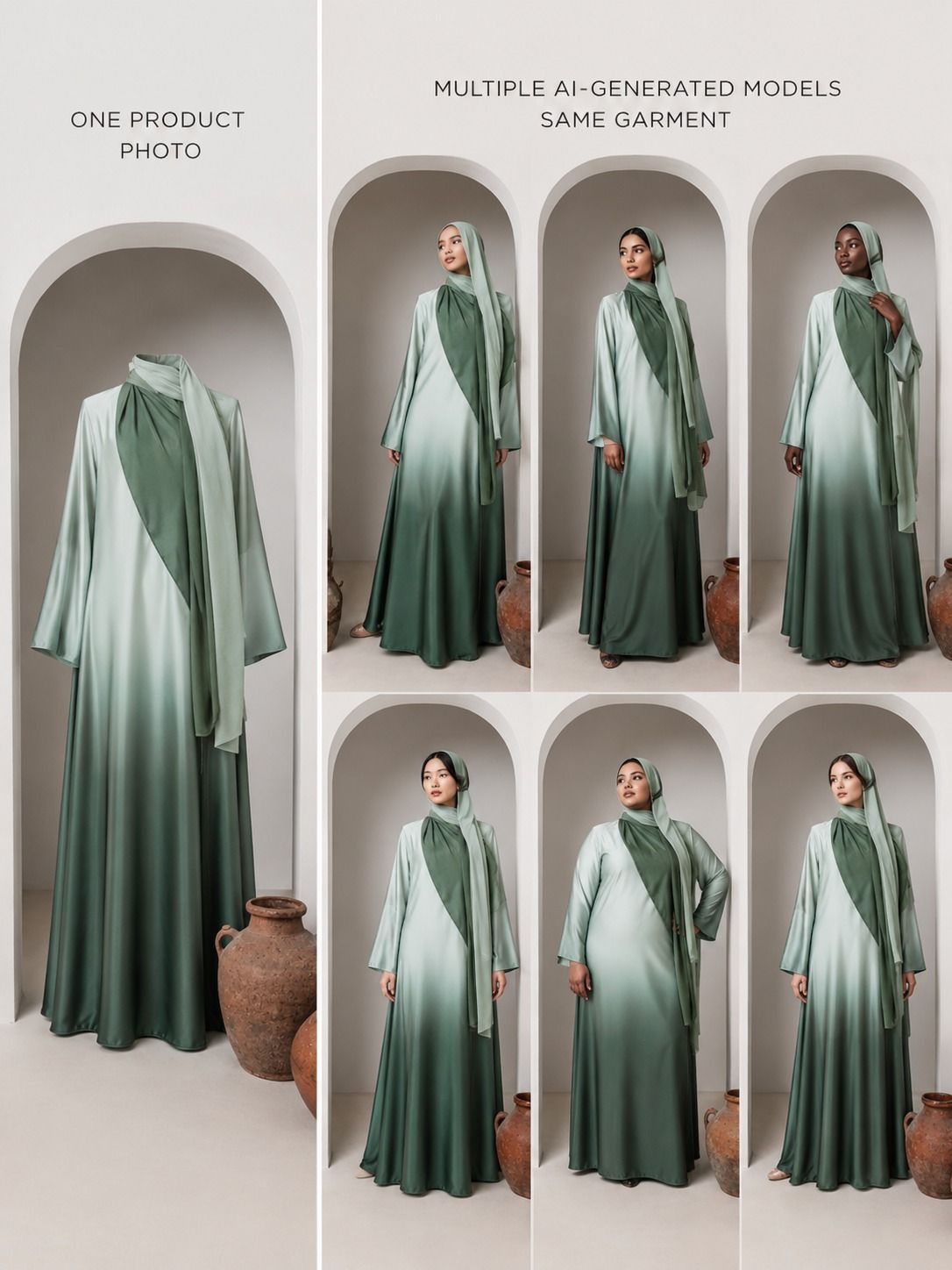
The core function across these tools is simple. You upload a flat lay image, ghost mannequin photo, hanger shot, or product image. The AI then places the garment onto a realistic digital model, generating professional on-model photos without booking photographers, models, studios, or retouchers.
The major differences between platforms come down to the level of diversity they support and how consistently they apply that diversity across a catalog.
Model Libraries vs. Generated Models
Some tools rely on fixed model libraries. Users select from a predefined gallery of models with varying ages, genders, body sizes, and skin tones. This approach is predictable but limited by the available library.
Other platforms dynamically generate models, offering greater control over attributes such as ethnicity, age, body type, and size range. This provides significantly more flexibility for brands targeting diverse customer segments.
The Real Challenge: Catalog Consistency
Creating a single convincing AI-generated image is relatively easy. The real challenge is generating 50, 100, or even 200 product images that all look like they came from the same photoshoot.
Many tools struggle here. If every image uses different lighting, styling, or model identities, the catalog begins to feel inconsistent. Strong AI platforms maintain consistent visual direction while still introducing meaningful diversity.
What "Diverse" Actually Needs to Cover
For diversity in AI-generated fashion models to be commercially useful, it must cover the characteristics that genuinely affect buying decisions.
Skin Tone
Skin tone is often the first characteristic customers notice. Brands selling into markets such as South Asia, Africa, the Middle East, or Latin America need model options that accurately reflect their audiences. Diversity should be a genuine spectrum rather than a token alternative.
Body Type and Size Range
Consumers want to understand how clothing looks on bodies similar to their own. Showing a size 18 garment exclusively on a size 6 model forces customers to guess how the product will fit and drape. AI-generated model diversity allows brands to present the same garment across multiple body types and size categories.
Age Range
Fashion buyers span multiple generations, but most fashion photography focuses on a narrow age range. AI model generation enables brands to represent younger, middle-aged, and older consumers without requiring separate photoshoots.
Styling Context
Diversity isn't only about the model. It also includes how and where products are styled. A saree styled for a wedding, a casual outfit for everyday wear, or formal attire in a professional setting all communicate different use cases and increase product relatability.
How to Use Diverse Model Generation Without Losing Catalog Consistency
The goal isn't maximum variation. It's meaningful variation applied consistently.
Step 1: Define Your Core Customer Segments
Identify the customer groups most important to your business. These might be based on geography, demographics, body types, or purchasing behaviors.
For example, a global activewear brand may define segments such as:
- Athletic builds for North American and European markets
- Modest activewear styling for Middle Eastern customers
- Plus-size representation for inclusive fashion audiences
Step 2: Generate the Same Garment Across Segments
For each product, create multiple model variations representing your primary customer groups. This ensures every product reflects the diversity of your actual audience rather than treating representation as an optional extra.
Step 3: Keep Backgrounds, Lighting, and Styling Consistent
Consistency creates a professional catalog experience. While the models may vary, the visual framework should remain the same. Keep lighting direction, background style, and overall creative treatment consistent throughout the collection.
Step 4: Apply the Same Workflow to Every Collection
Once established, diverse model generation becomes part of the standard launch process. Every new collection automatically includes multi-segment representation without requiring additional photoshoots or production costs.
How AIVX Studio Handles Model Diversity
AIVX Studio generates on-model images for fashion, jewellery, footwear, gymwear, and accessories with diversity built into the workflow by default.
Skin tone options cover a broad global spectrum, including South Asian, East Asian, African, Middle Eastern, Latin American, and European representations. Brands can generate multiple variations from a single product upload without requiring additional photography.
Body type variation enables brands to present garments across different builds and size ranges. This is particularly valuable for fashion brands offering inclusive sizing.
For large catalogs, AIVX Studio applies consistent backgrounds, lighting, and styling settings across all model variations. The result is a catalog that remains visually cohesive while representing a broader customer base.
This functionality extends beyond apparel. Footwear can be shown on different foot shapes and skin tones. Gymwear can be displayed across various body types. Jewellery can be presented on different skin tones where contrast and appearance influence purchasing decisions.
Generated images are optimized for ecommerce marketplaces, brand websites, and social media channels. Product video generation is also available from the same upload workflow.
Frequently Asked Questions
What are AI tools for generating diverse fashion models?
These are AI-powered platforms that take a single garment image and generate realistic on-model photos across different skin tones, body types, age groups, and styling contexts without requiring separate photoshoots.
Why does model diversity matter for ecommerce conversion?
Customers are more likely to trust and purchase products when they see representations that resemble themselves. Diverse imagery improves confidence, reduces uncertainty, and can lower return rates.
Can I generate the same garment on models with different skin tones?
Yes. Platforms such as AIVX Studio allow brands to generate multiple skin tone variations from a single product image.
Does AI model generation work for plus-size and extended sizing?
Yes. Platforms supporting body-type variation can display the same garment across multiple sizes and body shapes.
How do I keep my catalog looking consistent if I'm using multiple model types?
Use consistent backgrounds, lighting, and styling treatments across all generated variations. Only the model characteristics should change.
Do I need different input photos for each model variation?
No. One clean product image is sufficient. The AI generates all model variations from the same source file.
Does this work for accessories like footwear, bags, and jewellery?
Yes. AI-generated model diversity can be applied to footwear, gymwear, jewellery, and other products that benefit from being shown on people.
How long does it take to generate model variations for a full collection?
Most images can be generated within minutes. Collections containing dozens of products can often be completed within a single day.
Can these images be used directly on marketplaces and social media?
Yes. Images are exported as high-resolution JPG or PNG files suitable for ecommerce platforms, websites, and social channels.
Is there a free way to try diverse model generation before subscribing?
Yes. AIVX Studio offers a free trial that allows users to upload a product image and generate diverse model variations before purchasing a subscription.
The Straightforward Answer
Diverse model imagery is not simply a representation initiative. It directly influences trust, purchase confidence, conversion rates, and return rates.
AI model generation allows brands to present products across multiple demographics without the cost and complexity of booking separate photoshoots. One product upload can generate multiple representations while maintaining consistent visual branding.
For fashion, footwear, jewellery, gymwear, and accessory brands, AI-generated model diversity makes it possible to build catalogs that reflect the customers actually buying from them.
Try AIVX Studio free—upload one product image and generate diverse on-model variations today.